This page describes how to build and run the example DoIP server included with the libdoip project, and how to customize its UDS behavior.
Overview
The example server application demonstrates a minimal DoIP server using the library's DoIPServer, DoIPConnection and DoIPServerModel types. The relevant example source files are located in the examples/ directory:
examples/exampleDoIPServer.cpp— program entry point and socket setup.examples/ExampleDoIPServerModel.h— exampleDoIPServerModelwith ready-made UDS handlers and a small worker thread that simulates a downstream transport (e.g. CAN).
The example shows how to:
- Configure server properties (VIN, logical gateway address, announcement settings).
- Open UDP and TCP sockets for DoIP announcements and diagnostic connections.
- Register UDS handlers using the
uds::UdsMocktest helper for local request handling.
Files of interest
inc/DoIPServerModel.h— contains theDoIPServerModelcallbacks that the application implements for connection-open, close and diagnostic message handling. Customize these callbacks to integrate your ECU logic.examples/ExampleDoIPServerModel.h— shows a concreteDoIPServerModelimplementation used by the example server. UDS handlers are registered viauds::UdsMockand typed helpers such asregisterReadDataByIdentifierHandler.examples/exampleDoIPServer.cpp— creates and configures aDoIPServer, sets logging level and starts listener threads that accept TCP connections.
ServerModel interface (important callbacks)
The DoIPServerModel struct (see inc/DoIPServerModel.h) exposes a few key callbacks your application implements. A concise summary:
onOpenConnection(IConnectionContext &ctx)— called when a new connection is established.onCloseConnection(IConnectionContext &ctx, DoIPCloseReason)— called during graceful/abrupt close.onDiagnosticMessage(IConnectionContext &ctx, const DoIPMessage &msg)— called for locally-handled diagnostic messages.onDownstreamRequest(IConnectionContext &ctx, const DoIPMessage &msg, ServerModelDownstreamResponseHandler cb)— called when the state machine wants to forward a diagnostic request to a downstream transport (e.g. CAN). The implementation should returnDoIPDownstreamResult::Pendingif it will respond asynchronously and callctx.receiveDownstreamResponse()when the response arrives.
Below is a minimal example implementation that forwards messages to a hypothetical CAN backend and forwards the response to the connection context.
Building the example
The project uses CMake. From the repository root, run the following commands to build the library and the examples (recommended with a clean build directory):
On success the example binaries are available under build/examples/.
Running the example server
The example executable is exampleDoIPServer. Run it from the build directory, optionally enabling loopback mode (binds announcements to 127.0.0.1 instead of broadcast):
The program will:
- Configure the
DoIPServer(VIN, logical address, announce interval). - Open UDP and TCP sockets for announcements and incoming diagnostic connections.
- Start two threads: one that polls UDP announcements and one that waits for TCP connections and processes TCP messages.
Customizing UDS behavior
The example registers default UDS services and a few typed handlers in ExampleDoIPServerModel:
- Diagnostic Session Control (
0x10) — registered viam_uds.registerDiagnosticSessionControlHandler. - ECU Reset (
0x11) — registered viam_uds.registerECUResetHandler. - Read Data By Identifier (
0x22) — registered viam_uds.registerReadDataByIdentifierHandler. - Tester Present (
0x3E) — registered viam_uds.registerTesterPresentHandler.
These typed helpers convert a raw diagnostic ByteArray request into typed parameters (for example a DID or a session type) and forward the request to the provided callback. The callback returns a pair of uds::UdsResponseCode and a ByteArray payload. Implement your own handlers to perform ECU-specific logic and return appropriate responses.
Example: register a handler for ReadDataByIdentifier to respond with a VIN value for DID 0xF190:
Integrating a real downstream transport
The example uses uds::UdsMock to simulate downstream behavior. For a real ECU you should implement ServerModelDownstreamHandler in DoIPServerModel::onDownstreamRequest to forward diagnostic messages to the physical bus (e.g., CAN) and call ctx.receiveDownstreamResponse() when a response arrives. The state machine will handle timeouts and transitions for you.
Simple downstream handler sketch:
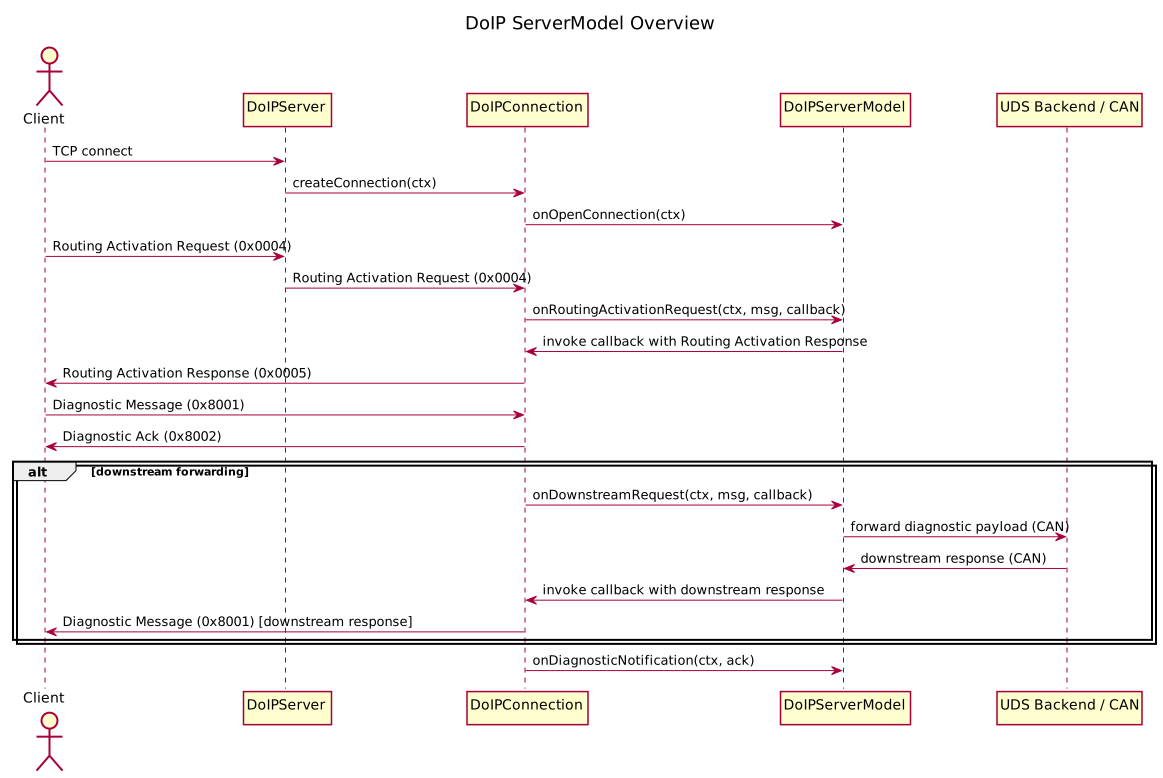
Diagram: ServerModel interactions
Below is a PlantUML diagram illustrating DoIPServer, DoIPConnection, DoIPServerModel and a downstream UDS/CAN backend interaction.
Logging and debugging tips
- The library uses
spdlog. Set the log level early inmain:
- Enable
--loopbackwhile testing locally to avoid network broadcast. - If the example appears unresponsive, check that TCP sockets were successfully created. The example logs critical errors when socket setup fails.
Troubleshooting common issues
exampleDoIPServerexits immediately with critical log about sockets:- Ensure you have sufficient privileges to bind the requested ports.
- Try running on loopback or using a system port range allowed by your OS.
- UDS handler not called:
- Confirm the incoming diagnostic request is parsed correctly. Use the library logging to inspect raw message bytes.
- If using downstream forwarding, ensure
onDownstreamRequestis set and that the downstream transport calls back toIConnectionContext::receiveDownstreamResponse.
Documentation / Doxygen
If you generate documentation with Doxygen, the file doc/ExampleDoIPServer.md will be picked up automatically if DOC_DIR or the INPUT setting in Doxyfile includes the doc directory. Run:
After generation, look for the "Example DoIP Server Tutorial" page in the generated HTML documentation.
Message flow and payload types
This repository and the example server follow the DoIP payload conventions used in the examples and tests. Important details to understand when implementing or testing downstream forwarding:
- Incoming diagnostic requests from the client are sent as DoIP Diagnostic Messages (payload type 0x8001).
- Immediately after receiving a diagnostic message the DoIP server sends a Diagnostic Ack (payload type 0x8002) back to the client. This ack is sent regardless of whether the message will be handled locally or forwarded downstream. The ack acknowledges receipt at the DoIP transport level.
- If the server forwards the diagnostic request to a downstream transport (for example, CAN), it does so only for Diagnostic Messages (0x8001).
- When a downstream response arrives, the DoIP server sends that response back to the client as a Diagnostic Message (0x8001). That means the client may observe two DoIP messages for a single request: the Diagnostic Ack (0x8002) and later the downstream Diagnostic Message (0x8001) containing the actual UDS response.
ISO 13400 describes DoIP message and payload types. The immediate ack behaviour is consistent with a transport-level acknowledgement: the server confirms reception on the DoIP link while the actual diagnostic response may be pending. If you require strict timing or synchronous behaviour, do not rely on the ack as an application-level confirmation — always await the downstream Diagnostic Message for the functional UDS response.
Next steps
- Replace
uds::UdsMockwith a real UDS stack or backend for production. - Extend the example model with additional UDS services as needed.
